Deployed · Internal application
RFP Response Platform
Answering one RFP meant days of reading, drafting and chasing sign-off — 35–40 hours in my own workflow before this. The system does the reading and the drafting; people keep all five decisions.
Business impact
-
5–10 hours
Per RFP today
Down from 35–40 hours, my estimate of my own prior workflow.
-
58%
RFP win rate
14 of 24 in 2026, up from 3% (1 of 33) in 2025.
-
$1.8M
Net new revenue
Across all 14 wins, April to 1 November 2026.
-
$20K/year
Software saving
Annual legacy software expense eliminated.
Sales outcomes the workflow supported, across both the plugin and the deployed app. Hours per RFP are my own estimate, not an audited time study.
Watch the walkthrough Project details Explore the architecture Engineering decisions
One clause, start to finish
A buyer’s template arrives with a liability cap in it. That is the kind of question the system is built not to answer by itself, and following one through is the shortest way to see what the five checkpoints are for.
- It flags the clause rather than drafting it. Answers are assembled only from approved answer-library rows. Indemnity and liability wording has no row a writer may reuse, so the pipeline marks it as needing an owner instead of producing text a model composed.
- It drafts the question and assigns it to Legal. One message, with the clause and the context around it. The system never sends the email — the writer sends it from their own client, and Legal’s reply is recorded against the question with their name on it.
- The proposal waits. Nothing downstream can mark that answer ready, and the chat assistant will not do it either: asked to approve the batch, it declines and says the approval is a person’s click. When Legal does sign off, the system stores a fingerprint of the exact wording reviewed — so if the text is edited afterwards, the approval is marked out of date rather than quietly carried over to words Legal never read.
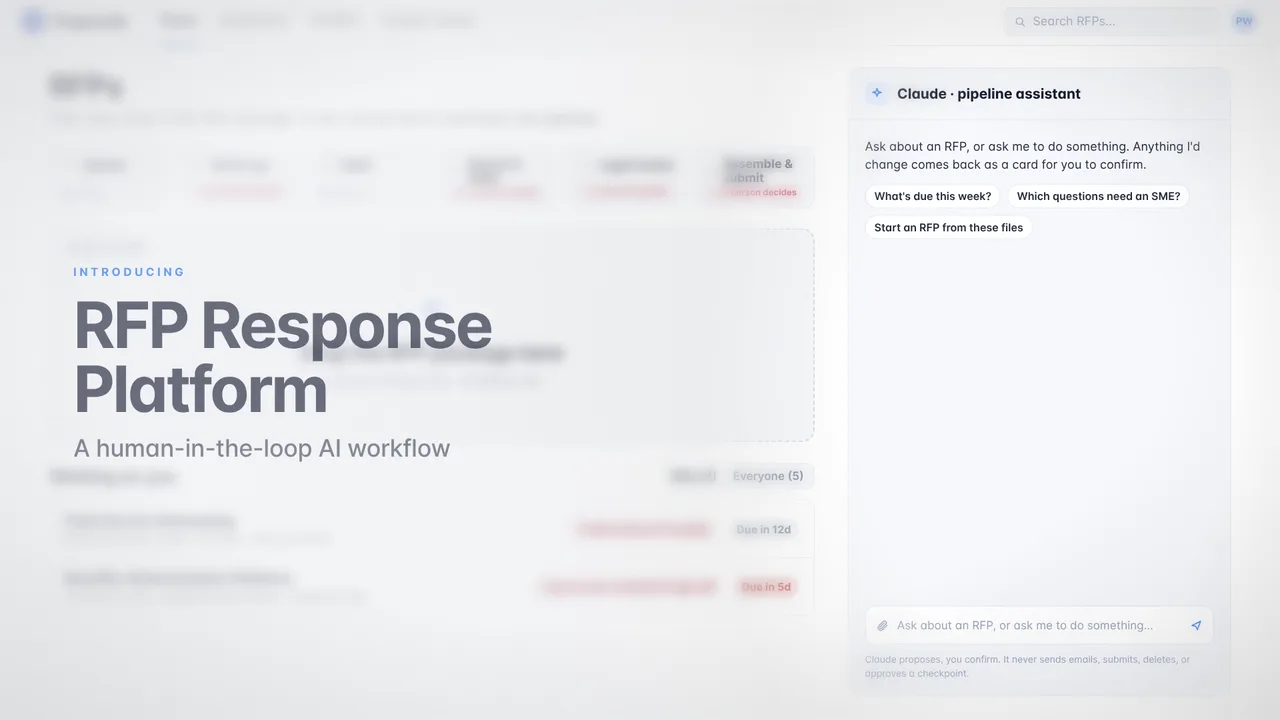
The walkthrough below is a recording of the real workflow, at the stage it ran as a Claude Code plugin.
Watch it run
Project details
My role
I wrote the module: the Python pipeline on AWS Lambda and DynamoDB, retrieval and drafting against Claude on Amazon Bedrock, the Vue and TypeScript interface, the five human checkpoints, and the Claude Code plugin it started as. I handed that code to our Director of Innovation, who owns the internal application's shared framework; he reviewed it and ran the deployment.
The module is mine and the framework it runs inside is not: the Director of Innovation built and maintains that, and reviewing and deploying my code was his. The answer library the pipeline retrieves from is one I had already assembled. The employer is a Human Capital Management B2B SaaS company; it and my colleagues are not named here.
Project status
Built as a Claude Code plugin May–June 2026 and used on live proposals from June; the pipeline was deployed into the internal application in October 2026. Of the 24 proposals in the April to 1 November 2026 window, 20 ran on the plugin and 4 on the deployed app.
Validation and scope
- It never sends email. It drafts one message per expert; the writer sends it from their own client.
- It never submits to a buyer, and it does not assemble the final proposal document.
- The spreadsheet answer library is still the master copy. The app reads it and suggests updates back.
- No job and no assistant can make a checkpoint decision. All five are a person's click.
- Processing time in the video is compressed and marked "Sped up". A real analysis takes minutes.
Built with
- Vue
- TypeScript
- Python
- AWS Lambda
- DynamoDB
- Claude on Amazon Bedrock
- Claude Code plugin
How the results were measured
Our team now spends 5–10 hours on an RFP. Before this, my own workflow took 35–40 — that figure is my estimate, from comparing how I worked before and after, not an audited time study. As an outside point of reference and nothing more, Loopio reports an industry average of 33 hours per RFP, and 36 for dedicated proposal teams; it is not evidence about this team.
The company's RFP win rate was 58% in 2026 — fourteen wins in twenty-four proposals — against 3% in 2025, one win in thirty-three. These are different reporting periods rather than a controlled comparison, the 2026 sample is the smaller of the two, and the go/no-go workflow changed which opportunities were pursued. The comparison does not isolate the effect of the software.
Those proposals produced $1.8M in net new revenue between April and 1 November 2026, across all fourteen wins. Twenty of the twenty-four proposals were produced with the Claude Code plugin and four with the deployed application, so the figures cover both versions rather than either one alone.
Replacing the legacy tool eliminated $20,000 in annual software expense. A full run costs $10–20 all in: storage, hosting, API calls and model tokens.
What I'd do next
- Run the retrieval and drafting evaluations against the deployed model rather than the local mock, so quality is measured where it actually runs.
- Move the answer library off the spreadsheet that is still its master copy — the last manual step in the loop.
- Widen the permissions model. RFP pages are admin-only in the code I wrote; which roles hold them in the deployed app is the Director of Innovation's call, not mine.
- Instrument the go/no-go decision, so the selection effect in the win-rate numbers can be measured rather than estimated.
How the workflow runs
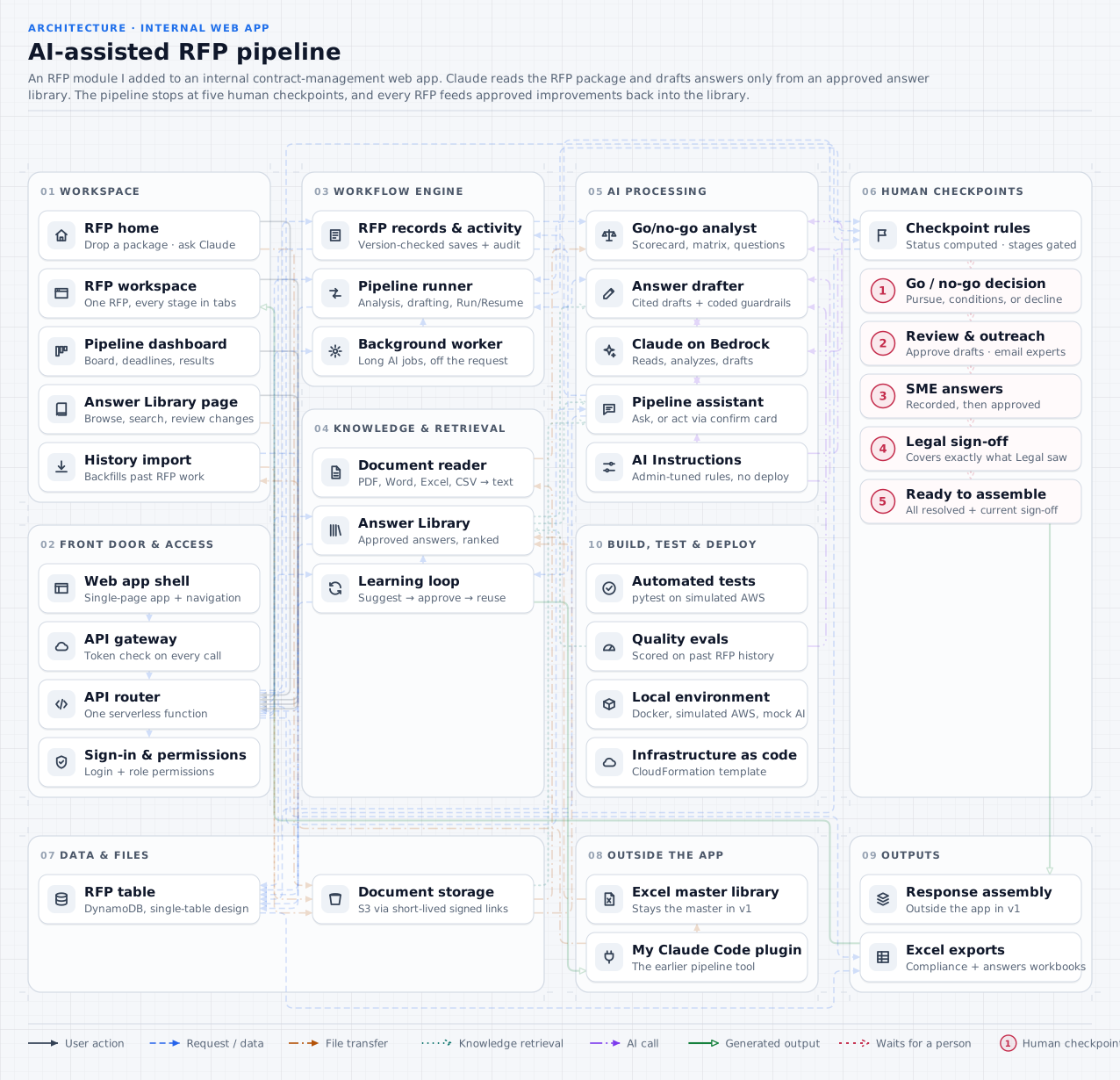
A writer drops in the package and analysis runs in the background. It stops at a go/no-go a person makes under their own name; drafting starts only after that, from approved library rows and cited to them. The four remaining checkpoints are the same shape — the writer approves answers, experts answer by email and are credited, Legal signs off on the exact wording it reviewed — and only then is the proposal ready to assemble. The chat assistant can do any of the work and none of the deciding.
Architecture
Background jobs over a document store, retrieval against the approved library, a permissions layer on each checkpoint. Below, one proposal goes through all thirteen steps — five of them stop and wait for a person. Select any component for what it does and why.
-
01 Start
An RFP package arrives
Someone drops the RFP package (PDFs, Word files, Excel questionnaires) onto the RFP home page. The app creates the RFP record, and the browser uploads each file straight to storage through a short-lived signed link, so large files never pass through the API.
- Also. Past RFPs can be backfilled from my earlier plugin's history, so dashboards and results start complete.
-
02 Automatic
The analysis starts in the background
An analysis takes minutes, but the API must answer within 30 seconds, so the run is handed to a background worker and the page follows its progress. Only one job runs per RFP: a lock taken with a conditional write stops a double start, and expires on its own if a job dies.
-
03 Automatic
Every document is read
The document reader pulls text from PDF, Word, Excel and CSV files. Excel questionnaires are read by their header row, so each question keeps its place in the issuer's sheet. Extracted text is cached beside the file, so a re-run skips what's already been read.
- If a file can't be read. Scanned PDFs without a text layer are flagged on the RFP instead of being silently skipped.
-
04 Automatic · AI
Claude builds the go/no-go picture
Claude reads the package and returns a pursuit scorecard with a recommendation, a compliance matrix of every requirement, and the list of questions to answer. Rules written by admins on the AI Instructions page are added to the prompt. The results are saved to the RFP.
-
05 Human checkpoint 1
Checkpoint 1: a person decides
The run stops. A person reads the scorecard and compliance matrix and records Pursue, Pursue with conditions, or Decline. The AI's recommendation is advice only: no job and no assistant action can record this decision.
- Decline. The RFP is closed with its reason, and nothing is drafted.
- Submission portal. If the questions sit behind a portal, a person uploads them before drafting can start.
- Pursue. Resume carries the pipeline on to drafting.
-
06 Automatic · AI
Answers are drafted from the library
For each question, library search offers Claude the 20 best-matching approved answers. Claude drafts from only those rows, cites them, and marks each answer Verified, Adapted, or Needs an expert. Code then enforces the rules whatever the model said: citations must be rows that were offered, a row with an open conflict blocks the answer, and legal wording stays word for word.
- Library changes mid-run. A run keeps the library version it started with, even if someone uploads a new one meanwhile.
-
07 Human checkpoint 2
Checkpoint 2: review drafts, reach out to experts
Reviewers read, edit and approve each draft. Questions the library couldn't answer are grouped by expert into ready-to-send outreach emails. The app drafts them; people send them from their own email.
-
08 Human checkpoint 3
Checkpoint 3: expert answers come back
An expert's answer is recorded on its question and appears for everyone on the RFP within seconds. The writer approves it, or leaves the question open on purpose with a reason. Every approved answer is offered to the library as a suggestion.
- Loop. Review and expert answers repeat until every question is approved or deliberately left open.
- Not built yet. A workspace where experts answer directly in the app.
-
09 Human checkpoint 4
Checkpoint 4: Legal signs off
Answers with legal or AI wording, contract terms we don't fully comply with, and go/no-go red flags are gathered on one page and sent to Legal. Legal signs off or asks for changes. The sign-off records exactly what Legal saw, so changing any of it afterwards makes it out of date.
- Changes requested. The writer edits and sends it again, and Legal reviews the new version.
- Permission. Only people with the Legal sign-off permission can sign off.
-
10 Human checkpoint 5
Checkpoint 5: ready to assemble
A person marks the RFP ready. The app allows it only when every question is resolved and Legal's sign-off is still current, and the same rule applies whether the stage is changed in the workspace, on the board or through the assistant.
-
11 Output
Export and assemble
The team downloads styled Excel workbooks: the compliance matrix with the pursuit scorecard, and every answer with its status and sources. In this version the final response document is assembled outside the app and submitted by a person. The app never submits anything.
-
12 Loop
The library learns
Approved answers, expert answers, open gaps and stale rows become suggested library changes. The library owner approves them (Legal too, for legal wording), and search and drafting use approved changes at once. They're exported as a change file that my earlier plugin's script applies to the Excel master, which comes back as the next library version.
-
13 Alongside
Anytime: ask the assistant
On any RFP page, people can ask Claude about the pipeline, an RFP, its documents or the library, and answers come from the app's own data. The assistant can also propose an action, like starting a run or assigning questions, as a card that does nothing until the person clicks Confirm. It has no way to make checkpoint decisions, send, submit or delete.
Engineering decisions
Pick one to read it. The constraint, the implementation and the cost are behind each.